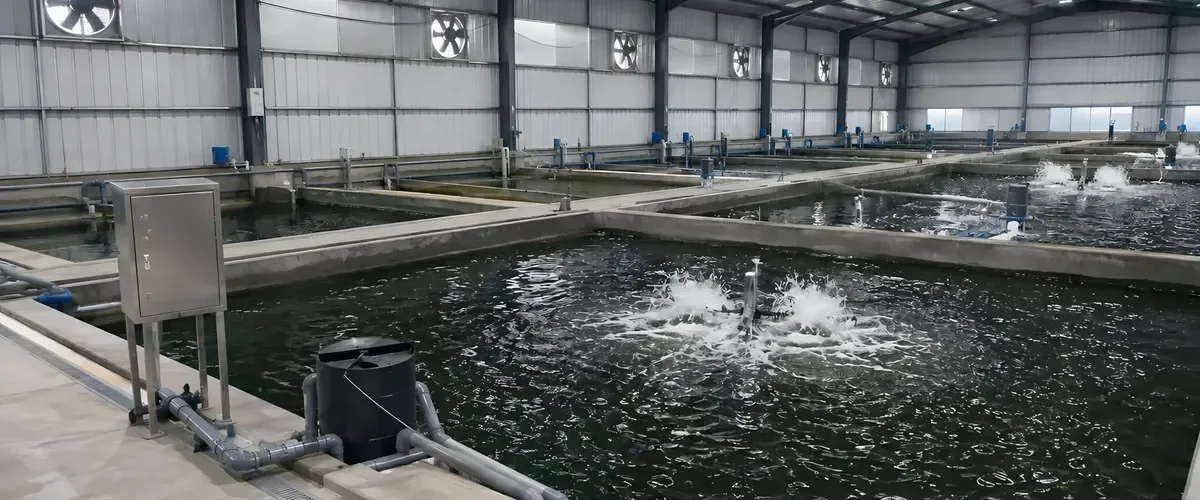
A power outage alarm (also called a blackout alarm or power failure notification system) is a small box added to the power line of your equipment. As soon as it detects a power cut, a sudden voltage drop or abnormal current, it contacts you on its own by LINE, SMS, email or a voice call. It is useful anywhere that a power cut nobody knows about means trouble: aerators at a fish pond, ventilation and heating in a greenhouse, cold storage, nurseries and water pumps.
What matters most when choosing a power outage alarm is not how many features it has, but a very practical question: when the whole site loses power, can it still get the alarm out? This article answers that question first, then goes through what to check before you buy and how it is used in different settings.
When the Power Is Out, Can the Alarm Still Get Out?
Many people think an alarm with a battery is enough. In fact, to send an alarm during a blackout it has to get through two checkpoints. First, does the alarm itself still have power? Second, is the network it sends through still working?
Every version of the YenProtek Power Outage Alert Module has a built-in battery, so all of them pass the first checkpoint. The three versions differ at the second one:
| Version | How the alarm gets out | When the whole site loses power | Best suited for |
|---|---|---|---|
| Wi-Fi Version | Goes online through the router and modem on site | Depends on whether the router and modem still have power after the outage; if they do not, the alarm cannot get out | Indoor or fixed sites that already have a stable network |
| NB-IoT Version | Built-in SIM card that connects directly to the mobile network, without relying on network equipment on site | The module has a battery and its own connection, so it can still send an alarm after the power goes out | Remote outdoor sites with no fixed network, such as fish ponds and pumping stations in the fields |
| 4G Version | Also has a built-in SIM card and uses the 4G mobile network | Like the NB-IoT version, it can still send an alarm after the power goes out | Places where the local NB-IoT network is not widely available; overseas (Thailand, for example), 4G may be the better fit |
In short: if the whole site could lose power, choose the NB-IoT or 4G version. The Wi-Fi version is not unusable, but whether it can notify you during a blackout depends on whether the router and modem on site still have power. Make sure of that before installation.
One more thing to know: mobile network cell towers need electricity too. Towers usually have backup power, which covers an ordinary outage, but a typhoon or heavy rain that causes a large, long-lasting outage can also knock them out. In the U.S., for example, when the Federal Communications Commission (FCC) reviewed Hurricane Katrina in 2005, it noted that backup generators at cell towers are generally designed to run for 24 to 48 hours. That is why the YenProtek module also keeps data in temporary storage: when the signal is weak, it saves the data first and sends the missed data once the signal returns. Before a big typhoon, still arrange in advance how your people will stay in contact and who will check the site.
To learn more about how the different connection methods compare, see “Wi-Fi, LoRa, NB-IoT or 4G: How to Choose?”.
6 Things to Check Before You Buy
1. What signal can you get on site?
For the Wi-Fi version, check that Wi-Fi is stable where the equipment is, not just in the office. For the NB-IoT or 4G version, check that your local carrier offers that network and that there is signal next to the equipment. The easiest way is to take a phone to the planned installation spot and check the reception. If you are not sure, tell us the location and we will check it with you.
2. Do you want to detect the main power, or each piece of equipment?
Watching only the main power tells you “the whole site is out,” but not that “the breaker of one aerator has tripped” or “the power is back but the equipment did not start again.” Even if power is restored quickly, aerators, pumps and similar equipment may not restart on their own. The YenProtek Power Outage Alert Module measures both voltage and current, and one unit can monitor up to 4 equipment circuits. We suggest connecting one circuit to each of your most important machines, so that when something stops you know which one it is.
3. What kind of power does the equipment use?
The module supports voltage and current monitoring on AC 110V/220V. If your site uses three-phase power or high-power motors, tell us how your power is distributed first so we can confirm how to connect it, and then have a qualified electrician do the work.
4. Who should be notified, and how?
Sending out an alarm is not enough; someone has to receive it and act on it. The YenProtek module supports LINE, SMS, email and voice calls, can notify several people at once, and can be set up with escalating notifications: if the first person does not respond, the next person in charge is notified in turn. When the power goes out in the middle of the night, a voice call is less likely to be missed than a phone push notification. Remember to include shift workers and substitutes in the list, and update it when people change.
5. Is notification enough, or do you also need to start backup equipment?
At some sites, knowing about the outage is enough, since people will go and deal with it. At others, nobody can get there in time, and the backup aerator or generator needs to be started first. The Power Outage Alert Module can be used with the Smart Control Box: if the backup generator on site has a contact for remote start, we can separately assess pairing it with a Smart Control Box and related electrical equipment to start the generator during an outage. The Smart Control Box only handles the on/off switching of power. High-power or three-phase motors such as aerators and pumps are wired through an external circuit by a qualified electrician.
6. Do you want to keep power-use records?
Besides notifying you during an outage, the alarm is also measuring all the time. The module keeps a history of voltage and current, which shows whether equipment trips often, whether power use suddenly jumps, or whether it starts and stops too frequently, and can serve as a reference for equipment checks and maintenance. The records can be kept on the YenProtek cloud management platform, or set up on your own server depending on the project. If you want to connect to an existing management system, an API connection is also available.
Common Settings: Where Is It Needed Most?
Fish ponds and shrimp ponds
Once aerators and paddlewheels stop, the dissolved oxygen in the water starts to fall. The middle of the night and early morning are the most dangerous times, and fish ponds often lose power all at once. For this kind of site, choose the NB-IoT or 4G version. For how to plan for outage risk and response, see “A Fish Pond Power Outage Is No Small Matter.”
Greenhouse
Greenhouses depend heavily on electricity. According to University of Florida IFAS Extension, in winter the fans and controllers of the heaters run on electricity, in summer the ventilation fans do, and a double-layer film greenhouse also needs electricity to keep the film inflated. It recommends installing an alarm that can notify people at home when the power fails, and testing it often. Irrigation pumps are the same: once they stop, no water reaches the crops. For automatic watering, see “What Is an Automatic Sprinkler System?”
Cold storage and freezer rooms
The worst thing about a power cut in a freezer room is finding out only when you open the door the next morning. The U.S. Food and Drug Administration (FDA), in its power outage advice for ordinary households, says a refrigerator keeps food cold for about 4 hours if the door stays closed, a full freezer holds its temperature for about 48 hours and a half-full one for about 24 hours, and the door should be opened as little as possible. Large cold storage rooms hold temperature differently, so these times cannot be applied directly, but the idea is the same: the sooner you know, the more time you have to decide whether to run a generator, move the goods or call someone. Metal walls in cold storage block signals, so test the reception at the planned spot before installing. For a comparison of connection methods, see “Wi-Fi, LoRa, NB-IoT or 4G: How to Choose?”
Nurseries
Vegetable and flower nurseries rely on electricity for heating, misting and supplemental lighting, and fish fry hatcheries rely on it for aeration and water circulation. One batch of seedlings is the start of a whole season, so if a power outage is not guarded against, the whole batch may have to be started over. Besides installing a power outage alarm, you can also add temperature and humidity monitoring to watch the conditions on site; see “What Agricultural Sensors Are There?”
Pumping equipment
When an irrigation pump, a drainage pump or the lift motor of a water tower loses power, the fields run short of water, and low-lying spots may flood. During typhoons and heavy rain, power outages and flooding often come together. For how to prepare for that, see “Flooded and Without Power, Who Will Notify You?”
How the YenProtek Power Outage Alert Module Does It
The Power Outage Alert Module is a power monitoring module developed in-house by YenProtek and added to existing equipment such as aerators and water pumps. It detects power outages and current anomalies and sends notifications right away. The key points:
- No need to replace your existing equipment: the module is connected in parallel to the power supply line of existing equipment. It can be added to aerators, pumps, feeders and cold chain equipment.
- One unit watches 4 pieces of equipment: it can monitor up to 4 equipment circuits, with voltage and current monitoring on AC 110V/220V.
- 3 kinds of problems trigger a notification: power outage, sudden voltage drop and abnormal current.
- Can still send an alarm after the power goes out: the module has a built-in battery. Communication comes in three versions, Wi-Fi, NB-IoT and 4G (choose one). The NB-IoT and 4G versions use built-in SIM communication, so they can still send alarms after the site loses power.
- No data lost when the signal is weak: when the connection drops, data is stored temporarily and sent once the signal returns.
- Several ways to be notified: LINE, SMS, email and voice calls. Several people can be notified at the same time, and escalating notifications can be set up.
- Power supply: AC 110V/220V mains power, or solar power depending on site conditions.
- Can trigger backup equipment: if the backup generator has a remote start interface, pairing with the Smart Control Box to start it during an outage can be assessed.
For specifications, compatible equipment and frequently asked questions, see the Power Outage Alert Module product page.
Frequently Asked Questions
Q1: If the power is out and the alarm has no power either, can it still notify me?
Every version of the YenProtek Power Outage Alert Module has a built-in battery, so it still has power after an outage. To get the alarm out, choose the NB-IoT or 4G version with built-in SIM communication, which does not depend on the network on site. For the Wi-Fi version, it depends on whether the router and modem on site still have power after the outage.
Q2: How do I choose between the Wi-Fi, NB-IoT and 4G versions?
The Wi-Fi version suits indoor or fixed sites that already have a stable network. The NB-IoT and 4G versions have built-in SIM communication and suit remote outdoor sites with no fixed network, and they can still send alarms after a power outage. Where the local NB-IoT network is not widely available, you can choose the 4G version; overseas (Thailand, for example), 4G may be the better fit.
Q3: Do I have to replace my existing aerators, pumps or refrigeration equipment?
No. The module is connected in parallel to the power supply line of existing equipment and measures voltage and current. Just add it on, and your existing equipment keeps working as before.
Q4: How will it notify me? Can it notify several people?
It supports LINE, SMS, email and voice calls. Several people can be notified at once, and escalating notifications can be set up so that more people in charge are notified in turn. When the power goes out in the middle of the night, a voice call is less likely to be missed than a phone push notification.
Q5: Can it start a generator automatically during an outage?
If the backup generator on site has a remote start interface, we can separately assess pairing it with the YenProtek Smart Control Box and related electrical equipment to start the generator during an outage. The Smart Control Box only handles switching power on and off. The switching circuits for high-power or three-phase motors and generators are wired through an external circuit by a qualified electrician.
Q6: Can it be used in countries other than Taiwan?
Connection bands, local telecom networks and certification requirements differ from country to country. Please tell us the country and site where you will use it, and we will confirm a suitable communication version and supply method; remote technical support is provided to overseas customers.
Not sure which version to choose?
Tell us the type of site, the equipment you want to watch, whether there is a network on site and which country you are in. We will help you work out which communication version suits you and whether to pair it with the Smart Control Box. Feel free to contact us.