Breeding cards written on paper
Which sow needs a pregnancy check, moving to the farrowing house or an iron injection depends on people remembering. The system lists today's tasks and overdue items every day, and you just tick them off when done.
Cloud Management Systems | New release

From breeding to weaning,
every litter is accounted for.
Once a mating is logged, return-to-estrus, pregnancy check and expected farrowing reminders are scheduled automatically. If the withdrawal period has not ended, exit registration is blocked.
The Pig Herd Management System is a cloud management system for pig farms developed by YenProtek with technology transferred from a leading Taiwanese university. It links breeding, medication, environment and biosecurity records by ear tag number. Parity and reminders are calculated by the system, and an exit cannot be registered until the withdrawal period has ended.
Why paper and spreadsheets are not enough
Which sow needs a pregnancy check, moving to the farrowing house or an iron injection depends on people remembering. The system lists today's tasks and overdue items every day, and you just tick them off when done.
Working out when a treated pig can leave the farm is risky if you get it wrong. The system calculates the earliest exit date from the medication record, and an exit cannot be registered before then.
In winter, windows are closed to keep warm, and ammonia and carbon dioxide rise with them. The system plots gas levels and temperature on the same chart so you can judge them together.
Function
Breeding, medication, environment and biosecurity records are all linked by ear tag number. The system blocks entries made out of order or before the withdrawal period has ended.
Enter an ear tag number to see the pig's basic data, a breeding timeline color-coded for mating, pregnancy and nursing, medication and vaccination, transfers and three-generation pedigree. Parity is calculated by the system, so you do not need to enter it.
For drugs in the drug master file, the withdrawal period is filled in automatically and the system calculates the earliest exit date. Registering a sale or slaughter during the withdrawal period is blocked. Rendering and euthanasia are not bound by the withdrawal period.
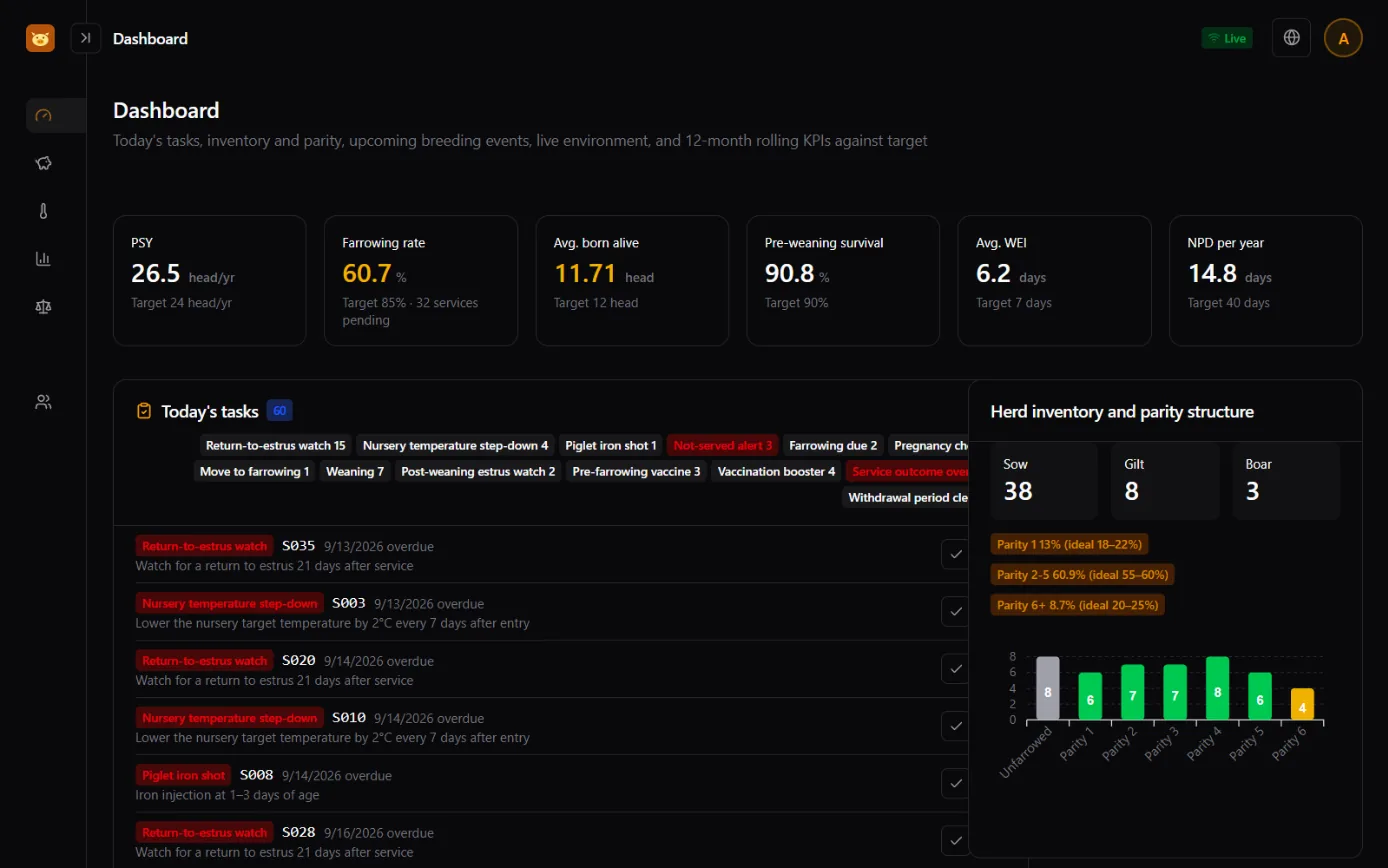
Pregnancy checks, return-to-estrus observation, moving to the farrowing house, pre-farrowing vaccines, piglet iron injections, booster vaccines, withdrawal period endings and more are listed automatically every day, in tabs by category. Log completing or skipping with one click.
Farrowing rate, conception rate, return-to-estrus rate, average total born and born alive, stillbirth rate, pigs weaned per litter, nursing days, WEI, annual NPD, litters per sow per year and pigs weaned, all compared with targets on one page.
Four steps: choose several criteria from total born, born alive, birth litter weight, weaning litter weight, return-to-estrus count, pre-weaning survival rate and others, and set their weights. The system ranks candidate sows and explains how each score is derived.
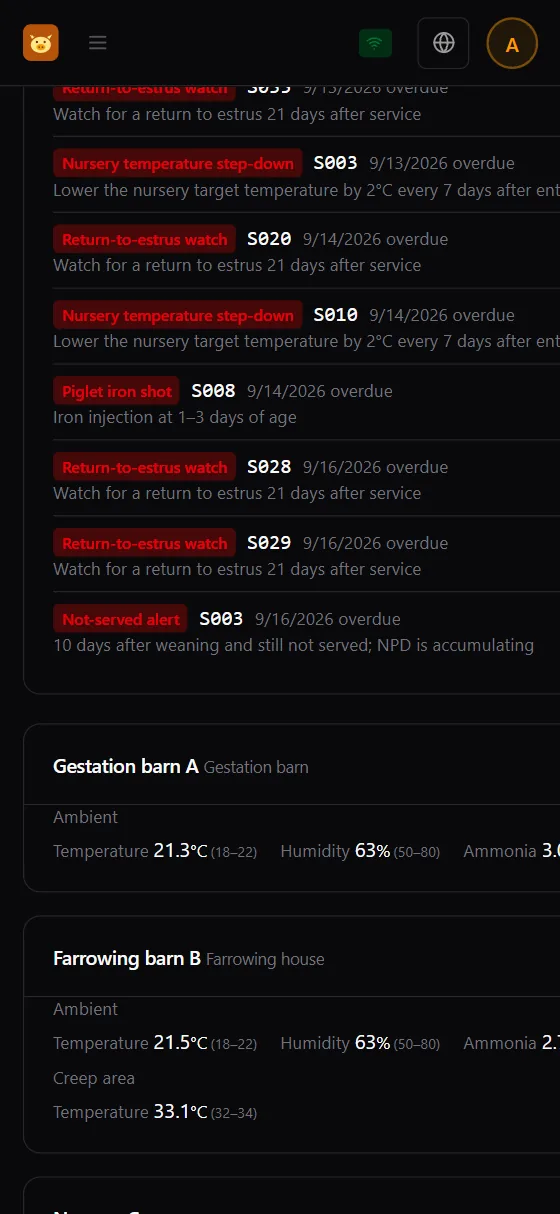
Temperature, humidity, ammonia, carbon dioxide and air speed each have thresholds for six barn types: gestation, farrowing, nursery, grow-finish, boar and isolation. In the farrowing house, the sow area and the creep area are plotted on the same chart.
Breeding chain
After a mating is logged, the system schedules each next step and its due date into Today's tasks. Entries made out of order are blocked, and a return to estrus, abortion or negative pregnancy check sends the sow back to awaiting breeding.
The breeding timeline on an individual's page uses color to distinguish gestation, nursing and open periods, and every segment also has a text label, so it does not rely on color alone.
System Screens

Actual system screen; data is sample data for demonstration
As soon as you open it, you see today's tasks and breeding indicators: which sows need a pregnancy check, moving to the farrowing house or an iron injection are all listed here, and you tick them off when done. Inventory and parity distribution are below.

Actual system screen; data is sample data for demonstration
Enter an ear tag number to go straight to the individual's page. The color-coded breeding timeline draws each litter's mating, gestation and nursing as color blocks, with open days marked by diagonal lines. The mating, farrowing and weaning tables are below.

Actual system screen; data is sample data for demonstration
Pick a barn type. The temperature color-band chart is at the top, and below it a trend chart overlays temperature, ammonia and carbon dioxide. For the farrowing house, the sow area and the creep area are both plotted.

Actual system screen; data is sample data for demonstration
Choose criteria, set weights, view the ranking and record your decision. Each candidate sow's score is broken down by criterion, so you can see how the score was calculated.

Actual system screen; data is sample data for demonstration
For swill cooking batches, the probe uploads the core temperature and the system determines whether the batch passed; a failed batch is marked as not to be fed. Visitors, vehicles and rendering destinations are also logged here, and reports can be exported.
Withdrawal period
When you log a medication, the drug master file fills in the withdrawal period automatically and the system calculates the pig's earliest exit date. Registering a sale or slaughter before that date is blocked by the system, which shows the earliest exit date. Rendering and euthanasia are not bound by the withdrawal period.
Select the drug, enter the start and end dates, the diagnosis and the prescriber. For drugs not in the master file, you can enter withdrawal days manually.
Medication end date plus the withdrawal period; the day the withdrawal period ends appears in Today's tasks.
Exit registrations for sale or slaughter are blocked; deleted medication records keep an audit trail.
Withdrawal days follow the value in the drug master file or the value entered at logging. This website does not list the values. Medication reports list the past 3 years by default and include antibiotic statistics.
Biosecurity
Visitors and vehicles, rendering destinations and swill cooking are each logged, and reports can be exported for use in inspections. Export is limited to supervisor-level permission and above.
Log entry and exit, purpose and origin, disinfection method (shower and change of clothes, vehicle disinfection pool) and the date of last contact with pigs. Contact with pigs within the past 3 days is flagged with a warning.
Rendering records are created automatically for dead pigs, logging the renderer and whether it has been reported. Missing slip numbers or unreported cases are added to Today's tasks as reminders to complete them.
The probe uploads the core temperature and the system determines whether the batch passed; a failed batch is marked as not to be fed. Neither the temperature nor the result can be edited on screen.
Export audit reports. Medication, visitor and vehicle, rendering and swill cooking reports can all be exported for use in inspections.
Roles and workflow
Accounts are created by administrators; self-registration is not available. Report export and index coefficient adjustment require supervisor-level permission or above.
Getting started
Set up the barns in the system to match your site's barn types and pens, and tell us how many sows you have and what you want to see.
Set up commonly used drugs with their withdrawal periods and each barn type's environment thresholds first, so they are filled in automatically when you log.
The administrator creates member accounts and roles, and registers the pigs on hand along with their current breeding status.
Field staff log from Today's tasks, and supervisors review indicators and reports. When something is abnormal, open environment monitoring and judge it together.
Platform
Just open it in a browser; no installation needed. You can also add it to your phone's home screen and open it like an app.
Each user chooses their own interface language.
It follows the device setting or can be switched manually, so the screen is easy on the eyes on night rounds.
Each role can view and edit a different scope. Accounts are created by administrators and self-registration is not available. When someone leaves or is replaced, the account is deactivated.
Sensor data and events are pushed to the screen with no need to refresh. Connection status is always visible, and disconnections are flagged.
Every change to thresholds and important data is recorded, so there is a basis for audits.
Compatible Hardware
The barn environment sensors and cooking probes are all YenProtek's own products.
The probe uploads cooking temperature to the cloud, and the system uses the temperature curve to determine whether each batch meets the standard.
For each pig: ear tag number, breed, birth date, parity, status and three-generation pedigree. Breeding records for mating, pregnancy checks, return to estrus, abortion, farrowing, cross-fostering and weaning. Vaccination and medication, transfers and exits. Temperature, humidity, ammonia, carbon dioxide and air speed for each barn type. Biosecurity records for visitors and vehicles, rendering destinations and swill cooking batches.
No. The system calculates parity, and the expected farrowing date is worked out automatically from the mating date. It also generates reminders for return-to-estrus observation, pregnancy check, moving to the farrowing house and expected farrowing, all listed in Today's tasks each day.
No. The system calculates the earliest exit date from the medication end date and the withdrawal period. Registering a sale or slaughter before that date is blocked and the earliest exit date is shown. Rendering and euthanasia are not bound by the withdrawal period. For drugs in the drug master file, the withdrawal period is filled in automatically; for drugs not in the master file, you can enter the withdrawal days manually, and the system reminds you if you leave it blank.
WEI is the number of days from weaning to re-mating. NPD is the number of days in a year that a sow is neither pregnant nor nursing. The shorter both are, the better the sow's time is used. The system calculates them automatically from mating, farrowing and weaning dates, and compares them with targets on the breeding indicators page, with filtering by parity.
No. The system ranks candidates based on the criteria and weights you select, and breaks down each criterion's contribution for every sow. Criteria with insufficient data are excluded and the weights are redistributed. The system outputs a recommendation; you make the final decision and record the reason.
Temperature, humidity, ammonia, carbon dioxide and air speed, with thresholds for each of six barn types: gestation, farrowing, nursery, grow-finish, boar and isolation. In the farrowing house, the sow area and the creep area are viewed together, and the target temperature in the nursery is lowered week by week with age. Sensors depend on your site layout, so please contact us.
Barn temperature, humidity, ammonia and CO₂ are measured by FarmerPack, and swill cooking temperature is uploaded by the YenProtek temperature probe. The layout is planned according to the barn types on your farm.
Visitor and vehicle entry and exit times, purpose, disinfection method and the date of last contact with pigs, with a warning flagged for contact within the past 3 days. Rendering records are created automatically for dead pigs, and missing slip numbers or unreported cases trigger reminders to complete them. For swill cooking batches, a probe uploads the temperature and the system determines whether the batch passed. All these reports can be exported.
Deleted medication records keep an audit trail. Threshold changes are logged. Swill cooking temperatures are uploaded only by the probe, and there is no function on screen to edit the temperature or the pass result.
The interface is available in six languages: Traditional Chinese, English, Japanese, Thai, Vietnamese and Malay. Regulatory fields and report formats are currently designed around Taiwan's regulations, and other markets need localization, so please contact us first.
The system cannot diagnose or prevent disease, but it keeps complete records of visitors, vehicles, medication and rendering of dead pigs, which helps carry out biosecurity and trace outbreaks. For African swine fever prevention practices, please see our knowledge article.
Same series
Start by going through every screen in the demo system, then decide together on barn types, thresholds and what to log.


